Unleash the magic of AI in HubSpot

Daeda AI enables Claude or ChatGPT with the most powerful tools in the market

Free 7-day trial · Plans from $125/mo

Automate The Unautomatable

Other tools give AI weak hooks into HubSpot.

Daeda AI gives it the full surface - safely.

Daeda AI vs other tools From the same AI on your laptop, other tools reach HubSpot through broken, partial connections, while Daeda AI delivers full portal access. Your AI Other tools Generic API Daeda AI HubSpot

Built for HubSpot Partners

For Solutions Partners who ship faster.

HubSpot Solutions Partner Program - Elite badge
HubSpot Solutions Partner Program - Diamond badge
HubSpot Solutions Partner Program - Platinum badge
HubSpot Solutions Partner Program - Gold badge
HubSpot Solutions Partner Program - Partner badge
HubSpot Solutions Partner Program - Provider badge

Capabilities

Ask Your AI. Approve the plan. Done.

Built for agencies and multi-portal ops.

Use Daeda AI to build a follow-up workflow that branches new contacts by lifecycle stage and creates a task for the deal owner.
Drafted Write Plan WP-4827

Plan ready - 1 operation, 1 workflow created. Approve to execute.

Reply... Opus 4.7 Adaptive
Portal 123456789
Sales follow-up: New unowned contacts Drafted by Daeda AI
Enrolment trigger
Branch by lifecycle stage
Lead
Create task
MQL
Create task
SQL
Create task
Customer
Create task
Use Daeda AI to find contacts in my HubSpot without an owner, grouped by lifecycle stage. Just give me the counts, no plan yet.
Recalibrated column naming conventions for accurate query execution

Here are the unowned contacts in your portal, grouped by lifecycle stage:

Lifecycle stageCount
Opportunity102
Customer94
Sales Qualified Lead46
Lead33
Marketing Qualified Lead27
Total302

Notable: 94 customers and 102 opportunities sitting without an owner - that's the bulk of the gap. Want me to draft a plan to assign owners?

Reply... Opus 4.7 Adaptive
Organize workflows into folders
Status Draft Executing Executed
Operations 5
Records 16
Portal 123456789
Drafted by Daeda AI "Organize my workflows into folders"
  • 1 Create Workflow Folder - Sales Pipeline
  • 2 Create Workflow Folder - Renewals
  • 3 Create Workflow Folder - RevOps Data Hygiene
  • 4 Move 5 workflows to Sales Pipeline
  • 5 Move 4 workflows to Renewals
Use Daeda AI to describe the contacts table in my HubSpot portal - what columns and associations does it have?
Indexed schema for object_type contacts in portal 123456789

Here's the structure of your contacts table: 0 properties · 0 custom

Property Type
email string · unique
lifecyclestage enumeration
hubspot_owner_id owner
hs_lead_status enumeration
createdate datetime
Associations contacts companies deals tickets
Reply... Opus 4.7 Adaptive
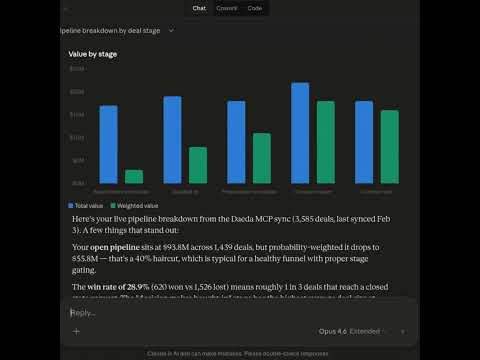
Use Daeda AI to summarize my open pipeline by deal stage. Show count and total amount for each stage.
Aggregated pipeline data and orchestrated visual chart presentation

Here's your open pipeline broken down by deal stage in the default pipeline (USD):

Open deals 128
Total value $10.42M
Avg deal $81.4K
Total amount Deal count
Sched
Qual
Pres
DM
Sent

Decision Maker Bought-In holds the highest value at $2.0M across 28 deals - that's where your near-term commit sits.

Reply... Opus 4.7 Adaptive

Workflows built in conversation

Describe the workflow you want. Daeda AI builds it in HubSpot, ready for review.

Ask anything about your portal

Plain-language questions, instant answers grounded in your live HubSpot data.

Every change is human-approved

Daeda AI drafts a Write Plan before any change runs. You review, then approve.

Knows your full portal schema

Discovers every property and association, so it never asks you to fill in the blanks.

Pipeline analytics on demand

Ask for a breakdown, get a real chart and the data behind it in seconds.

Security

Daeda AI keeps the AI sandboxed away from your portals.

The AI never gets direct access to run loose in HubSpot. It can recommend changes and draft the plan, but Daeda AI keeps the approval step inside your control before anything executes.

Write Plan Draft Review required
1

Create missing lifecycle audit report

2

Update workflow branch conditions

And that's just the beginning.

Daeda AI in action

The possibilities are endless

Are you ready to supercharge your agency with AI?

Book a demo and see how Daeda AI turns portal audits, implementations, and troubleshooting into reviewable plans.

Trusted by HubSpot teams running real ops

Customer quotes are from across the Daeda app catalogue. Daeda AI builds on the same team, the same support, the same engineering.

I've integrated Daeda Essentials into multiple high-volume workflow environments. Thoughtfully designed, reliable, and flexible enough to handle real-world business logic at scale.
Daeda Essentials Duke M.
Excellent and personal support - bridges gaps in Service Hub that native HubSpot doesn't cover.
Smart Lead Routing Cvejic D.
Jack Tolley was extremely responsive to my emails when I had questions or needed him to tweak the formatting. Look no further - I highly recommend.
Snippet Power Tools Anon
The Throttle action has been a lifesaver. It controls how many workflows execute simultaneously, preventing errors and keeping everything running smoothly. Jack is always an email away and ready to get on a call.
Daeda Essentials Vishwanath R.
The #1 app to download if you are serious about optimizing HubSpot. Easy to use, high impact and great value for money.
Daeda Essentials Delaney T.
Workflow queues are top notch - made my API limit issues GONE!
Daeda Essentials Decker N.

Who we are

We are bringing the magic of AI to HubSpot

Daeda AI is built by Jack and Tikita - who, for the last year have been using AI for everything, work and personal. When we saw HubSpotters starting to use Claude we noticed a gap between what devs are doing with AI and what HubSpotters are doing.

Meet Jack & Tikita →
Tikita
Tikita Co-founder Expands what HubSpot can do.
Jack
Jack Co-founder Makes things talk to HubSpot.

Daeda AI - frequently asked questions

Daeda AI is the paid HubSpot Marketplace app for AI-powered portal operations: Human-Approved Write Plans, multi-portal ops, portal audits, and AI-assisted troubleshooting. Daeda Portal Insights is a free read-only npm taster for power users comfortable configuring local AI tools. They share the team and the engineering, not the runtime.

Ready to see it in your portal?

Bring a real HubSpot problem to the call. We will show you what Daeda AI can draft, inspect, and approve.