.avif)
Track when each contact's phone number changes with automatic timestamp logging
Clean Dial's Last Phone Change Tracking automatically monitors and records when phone numbers are updated on your HubSpot contact records. This feature creates a complete audit trail of phone number modifications, helping you identify when contact data may need validation and ensuring your outreach efforts target the most current information.
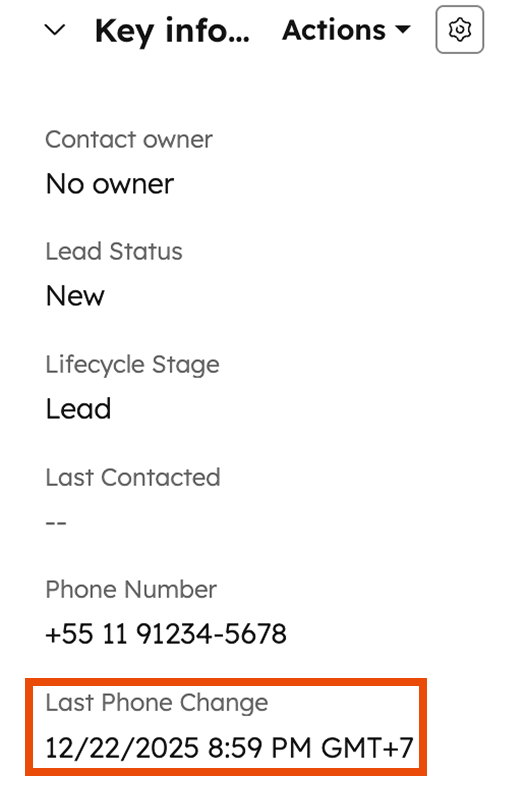
When phone numbers are updated on contact records, Clean Dial automatically:
Last Phone ChangeThis happens seamlessly in the background - no additional workflow setup required.
To view phone change timestamps on your contact records:
Data Freshness Monitoring
Smart Validation Workflows
Sales Intelligence
Intelligent Re-validation Workflows - create workflows that automatically trigger phone validation for contacts whose numbers haven't been updated in 90+ days, ensuring you're always calling current numbers.
Sales Prioritization Lists - build contact views that prioritize prospects with recently updated phone numbers, giving your sales team the best chance of successful connection.
Data Decay Monitoring - generate reports showing which contacts have the oldest phone number data, helping you proactively address data quality issues.
Lifecycle-Based Validation - set up workflows that validate phone numbers based on contact lifecycle stage and data age - for example, validating all SQL contacts whose phone numbers are older than 30 days.
last_phone_change
Q: Can I see when phone numbers were changed before this feature was enabled?
A: No, the timestamp tracking only captures phone number changes that occur after the feature is activated on your account.
Q: Does this track changes made through imports or API updates?
A: Yes, timestamps are recorded for phone number updates from any source - manual edits, imports, API updates, or workflow actions.
Q: What if a phone number is changed multiple times?
A: The timestamp always reflects the most recent phone number change. Previous change dates are not retained.
Q: Can I use this data in custom workflows?
A: Yes, you can create workflow enrollment criteria based on the Last Phone Change timestamp to trigger validation, follow-ups, or other actions.